

Managing inventory becomes more challenging as a business grows. A retail shop may handle hundreds of products, while a trading company may manage thousands of items across different categories.
When employees enter stock details manually, mistakes can happen. Product codes may be entered incorrectly, stock quantities may not match physical inventory, and billing can take longer than expected.
Barcode inventory management offers a practical way to improve these processes. By scanning product barcodes, businesses can record stock movements more efficiently and reduce repetitive data entry.
In this article, we will explain how barcode inventory management works, its key benefits and how businesses in Qatar can use it to improve daily operations.
What Is Barcode Inventory Management?
Barcode inventory management is a system that uses machine-readable product codes to identify items and record inventory transactions.
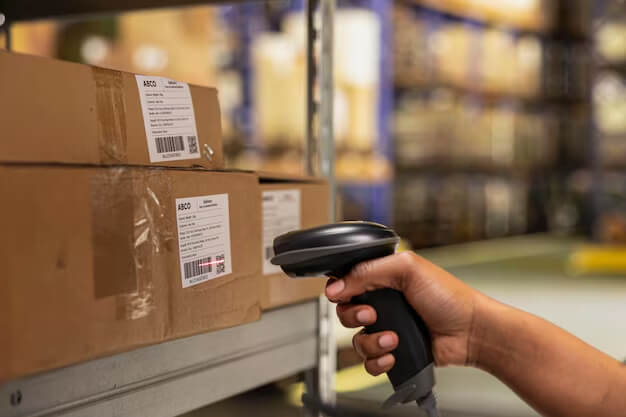
Each barcode represents a product or a specific item code. When an employee scans it using a barcode scanner, the connected software identifies the item and helps record the relevant transaction.
For example, a retail shop selling watches, bags, cosmetics and accessories can assign barcodes to its products. During sales or stock receiving, employees can scan the items instead of searching for each product manually.
Depending on the software and configuration, barcode scanning can support:
- Product identification.
- Purchase and goods-receipt entries.
- Sales billing.
- Stock transfers.
- Physical stock verification.
- Inventory adjustments.
As a result, employees can process routine inventory tasks more quickly and maintain more consistent records.
Why Do Businesses Need Barcode Stock Tracking?
Many businesses begin with spreadsheets or manual stock registers. These methods may work when the product range is small. However, managing inventory becomes harder as sales volumes and product varieties increase.
Here are some common challenges businesses face.
1. Manual Data Entry Errors
Entering product codes, quantities and descriptions manually can lead to mistakes. Even a small error may affect stock reports or sales records.
Barcode scanning reduces the need to type product identifiers repeatedly.
2. Slow Billing and Stock Processing
Searching for products manually can delay billing, especially during busy periods.
With a properly configured barcode system, employees can scan items and retrieve the corresponding product details more quickly.
3. Inaccurate Stock Records
Stock records may become inaccurate when purchases, sales, returns or transfers are not recorded correctly.
Barcode-based workflows help standardise item identification and make it easier to record stock movements.
4. Difficulty Tracking Multiple Products
Businesses with many product varieties may struggle to distinguish similar items.
For example, a shop may sell the same product in different sizes, colours or models. Unique item codes and appropriate barcode labels help employees identify the correct product.
7 Benefits of Barcode Inventory Management
Barcode inventory management can improve several areas of business operations when implemented correctly.
1. Faster Sales Billing
Cashiers can scan product barcodes instead of searching for every item manually.
This can reduce billing time and improve the customer experience, particularly in supermarkets, retail shops and high-volume stores.
2. Better Stock Accuracy
Scanning helps reduce errors caused by typing incorrect product codes.
However, stock accuracy also depends on recording all purchases, sales, returns, damaged goods and stock transfers correctly.
3. Easier Purchase and Stock Receiving
When new goods arrive, employees can use barcode scanning to identify products and record quantities.
This makes the receiving process more organised and helps the team compare received items against purchase documents.
4. Simplified Physical Stock Verification
Businesses need to compare actual stock with the quantities recorded in their inventory system.
Barcode scanners can make stock counting more efficient by helping employees identify and count products systematically.
Any differences can then be investigated and corrected through the appropriate inventory process.
5. Improved Product Identification
Barcodes help distinguish products that have similar names or descriptions.
This is particularly useful for businesses selling multiple brands, models, sizes and product variants.
6. More Efficient Inventory Reporting
When barcode scanning is connected to suitable inventory software, the business can use recorded transactions to maintain stock reports.
Managers can review available quantities, stock movement and inventory valuation, depending on the software’s capabilities.
7. Better Operational Control
A consistent barcode workflow helps employees follow the same process when receiving, selling, transferring and counting stock.
Consequently, managers can improve accountability and identify where inventory discrepancies occur.
Which Businesses in Qatar Can Benefit from Barcode Systems?
Barcode inventory management is useful across many industries. The right setup depends on the products handled, transaction volumes and operational requirements.
Retail shops: Clothing stores, electronics shops, supermarkets, cosmetics stores and jewellery businesses can use barcodes for product identification and billing.
Trading companies: Wholesalers and distributors can improve stock receiving, picking, dispatch and inventory verification.
Warehouses: Barcode scanning can support organised stock movement and item identification across storage locations.
Electronics businesses: Product models, serial numbers and other identifiers can be managed according to the system’s capabilities.
Pharmacies and specialised retailers: Barcode-based workflows can help identify products. Additional requirements, such as batch, expiry-date or regulatory tracking, must be checked separately before choosing a solution.
For businesses in Qatar that manage high product volumes, barcode scanning can be a useful part of a wider inventory management strategy.
What Equipment Do You Need?
A barcode inventory setup does not always require expensive equipment. Start by identifying the requirements of your business.
Common components include:
Barcode Scanner
A scanner reads the barcode and sends the product code to compatible software. Some scanners connect through USB, while others use wireless connections.
Barcode Labels or Printed Barcodes
Products need readable barcodes. Businesses can use existing manufacturer barcodes or generate labels for their own product codes when appropriate.
Computer or Billing System
A computer or point-of-sale terminal runs the software used to process transactions and maintain inventory records.
Compatible Inventory Software
The software must support the required barcode workflow. Before purchasing equipment, confirm scanner compatibility, barcode formats and the relevant inventory or billing features.
Label Printer (Optional)
Businesses that create their own product labels may need a barcode label printer. The choice depends on label size, printing volume and the working environment.
Important: A barcode scanner alone does not manage inventory. It must work with a properly configured system that records stock transactions.
How Does Barcode Inventory Management Work With TallyPrime?
TallyPrime supports business accounting and inventory management. Depending on the business requirements and configuration, compatible barcode scanning can be incorporated into relevant workflows.
A typical process may look like this:
Step 1: Create Stock Items
Set up product names, stock units, item codes and other required details in the inventory system.
Step 2: Prepare Barcode Identification
Use existing product barcodes or create suitable labels for products that require them.
Step 3: Configure the Scanner
Connect a compatible scanner and test it with the required software and transaction screens.
Step 4: Record Purchases and Sales
Use scanning in supported workflows to identify items and enter the relevant quantities.
Step 5: Review Inventory Reports
Check stock balances and movement reports to monitor inventory and investigate discrepancies.
The exact steps depend on the scanner, barcode format, software version and configuration. Some businesses may require additional setup or customisation to achieve their preferred workflow.
Before implementation, test the complete process using sample products and transactions.
Barcode Inventory Management vs Manual Stock Entry
| Feature | Manual stock entry | Barcode-based workflow |
|---|---|---|
| Product identification | Search or type details | Scan product code |
| Data entry | More manual input | Less repeated typing |
| Billing speed | May be slower | Can be faster |
| Product identification errors | Possible | Reduced when codes are correct |
| Physical stock counting | Manual identification | Scanning can assist counting |
| Initial setup | Usually simpler | Requires labels and compatible equipment |
Barcode systems can improve efficiency, but they do not eliminate every inventory error. Incorrect labels, duplicate product codes and unrecorded transactions can still cause problems.
Therefore, businesses should combine barcode scanning with regular stock verification and clear inventory procedures.
Common Mistakes to Avoid
Before introducing barcode inventory management, pay attention to these common issues.
Using duplicate product codes: Different products should have clear, appropriate identifiers. Otherwise, scanning may select the wrong item.
Ignoring product variants: Different sizes, colours or models may need separate stock records and barcode assignments.
Buying equipment before checking compatibility: Confirm that the scanner and software support the intended workflow.
Skipping staff training: Employees should understand how to scan products, record quantities and handle returns or damaged goods.
Failing to verify stock: Regular physical counts remain important, even when barcode scanning is used.
Ignoring backup and data protection: Keep suitable backups and access controls for the inventory system.
By addressing these issues early, businesses can introduce barcode workflows more smoothly.
How to Choose the Right Barcode Inventory Solution
Every business has different inventory needs. A small retail shop may require only basic product scanning and billing, while a distributor may need warehouse workflows and multiple stock locations.
Before choosing a solution, consider the following questions:
- How many products do you manage?
- Do you sell individual items or bulk quantities?
- Do you need barcode scanning for purchases, sales or both?
- Do you manage multiple branches or warehouses?
- Do you need batch numbers, serial numbers or expiry tracking?
- Does your current accounting software support the required scanning process?
- Will you need installation, staff training or customisation?
Also, calculate the full implementation cost. Include scanners, labels, printers, software configuration, training and ongoing support where applicable.
The best solution is one that fits your daily workflow without making routine tasks unnecessarily complicated.
Need Help With TallyPrime and Inventory Management in Qatar?
Welcome Trading Co. W.L.L helps businesses with TallyPrime licensing, installation, implementation, inventory setup, customisation, training and technical support.
Our team can help you assess your requirements and explore a suitable accounting and inventory solution for your business.
Website: https://welcometech.qa/
Phone: +974 6603 2346
Email: sales@welcometech.qa